Essendo opportuno agire come root per sospendere prima e riattivare poi il server mysql, è bene che il file di configurazione di rclone sia anche in /root/.config/rclone (lo si può copiare da /home/utente/.config/rclone).
how to convert an md file md in odt
You can use pandoc.
In Linux you can then add to Dolphin menu a new action, like: “pandoc %U -o %u.odt && rename 's/md.odt/odt/' *.odt“
I prefer this:
cat %U >> Archivio/$(basename "%u") && sed -i -e 's@<span class="symbol">\\<\\/span>@[\\]{custom-style="symbol"}@g' -e 's@<span class="symbol">\\<\\/span>@[\\]{custom-style="symbol"}@g' -e 's@<span class="symbol">\\<\\/span>@[\\]{custom-style="symbol"}@g' -e 's@<span class="symbol">\\<\\/span>@[\\]{custom-style="symbol"}@g' %U && pandoc --lua-filter odt-custom-styles.lua %U -o %u.odt --reference-doc="default.ott" -f markdown-auto_identifiers && rename 's/md.odt/odt/' *.odtwhere defaul.ott (LibreOffice defaul template, so that I get an odt file with desired styles) is symlinked from /home to the folder where I have the md files.
Prefer the last pandoc realease, which recognizes filters.
Convert blockquotes
Not:
normal text
> blockqoute
normal text
but
normal text
> blockqoute
normal text
speech to text in Linux con KDE connect
If you cannot speak-to-text directly from the smartphone to PC, you can before dictate a text within KDE Connect and then, after, send it to your PC (provided that your smartphone and your PC are both connected with KDE Connect):
KDE Connect (on smartphone) – > remote input -> small icon on high, as below

Then choose as keyboard, Google Voice Typing

Then you will be able to dictate your text (seeing it, before, on the smartphone [KDE connect] screen) and send it to your Desktop device.

recuperare files cancellati sullo smartphone
Mi è successo che DrBoost mi abbia cancellato dallo smartphone la cartella Documents, che pure dovrebbe essere di sistema e con essa alcuni files di documenti, frutto di ore e ore di lavoro (di schedatura).
Per recuperarli ho provato varie apps di android, che però salvano solo foto, video e audio e non documenti.
Allora ho provato dei software da PC, il più promettente dei quali mi è parso drfone, che però si è fermato all’incapacità di rootare il dispositivo, che del resto ho preferito poi non rootare.
suggerimenti nella barra dei suggerimenti di Gboard
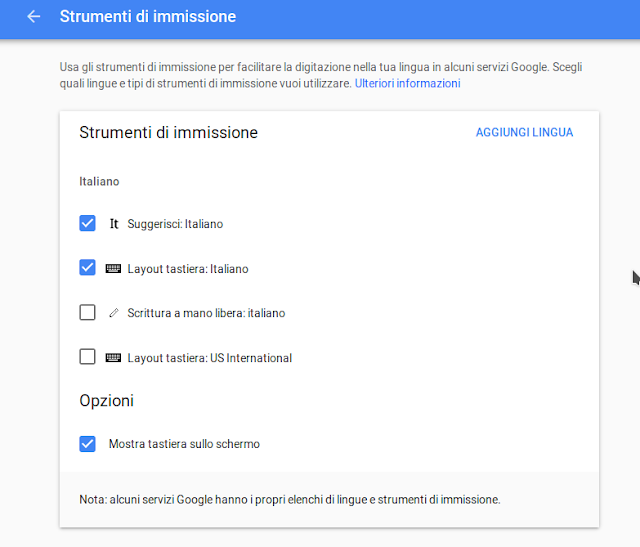
Non compare niente nalla barra sopra i tasti ad esempio perché non si è loggati con account Google in cui si sia settato di mostrare i suggerimenti, come da screenshot:

Dopo aver settato, non dimenticare di fare un reset allo smartphone.
dettare la punteggiatura con Google su android
Si possono dettare “punto” per “.” e “virgola” per “,”: bisogna abbassare il volume della voce e pronunciare tali voci di punteggiatura possibilmente a ridosso della parola precedente, senza pause.
server php/mysql su android
Sconsiglio vivamente KickWeb Server: un disastro, non è personalizzabile.
Se volete buttare via tempo provate moNERIngAo Server: semplicemente non parte il server!
risalire da terminale alla cartella superiore, in linux
Mentre in windows il comando è cd.., in linux è cd .. (con uno spazio prima dei due punti).
montare /smontare da terminale una chiavetta USB
Perché
Montare e soprattutto smontare da terminale una chiavetta USB in Linux ha il vantaggio che si può lasciare fisicamente la chiavetta nella sua porta USB rimanendo al tempo stessi sicuri che quanto doveva esservi scritto vi è già stato scritto e volendo si potrebbe sfilarla dalla porta quando si vuole, senza aspettare.
Se al contrario si usa la graficamente più comoda soluzione del safely remove, rimozione sicura della chiavetta, allora per poterla nuovamente montare (ed avere perciò praticamente disponibile) occorre sfilarla fisicamente e reinfilarla fisicamente nella porta USB.
Come
Dopo vari tentativi (tra cui con pmount) ho fatto così:
- modificato il file etc/fstab aggiungendo una riga di questo tipo: LABEL=pen-drive /media/user/pen-drive etx4 user,rw,noauto 1 2
- creato uno script bash per montare la chiavetta col comando “mount /dev/sdd5 /media/user/pen-drive”
- e un altro script per smontare col comando “umount /media/user/pen-drive”
no root uninstall system app in android
1) From smartphone enable debug USB (settings -> developer options or something similar);
2) enable MTP mode
3) istall and start adb (adb start-server).
4) search for exact name of the apps you want to remove (i.g. Facebook is “com.facebook.katana”).
5) in (linux) terminal do this command: adb shell pm uninstall –user 0 [appname]
It works!
As an example I made this bash file
#!/bin/sh
adb start-server
adb shell pm uninstall –user 0 com.facebook.katana
adb shell pm uninstall –user 0 com.facebook.orca
adb shell pm uninstall –user 0 com.asus.ephotoburst
adb shell pm uninstall –user 0 com.asus.task
adb shell pm uninstall –user 0 com.asus.gallery
adb shell pm uninstall –user 0 com.asus.microfilm
adb shell pm uninstall –user 0 com.asus.kidslauncher
adb shell pm uninstall –user 0 com.asus.fmradio
adb shell pm uninstall –user 0 com.asus.taskwidget
adb shell pm uninstall –user 0 com.google.android.apps.photos
adb shell pm uninstall –user 0 com.google.android.gm
adb shell pm uninstall –user 0 com.google.android.videos
adb shell pm uninstall –user 0 com.google.android.music
adb shell pm uninstall –user 0 com.google.android.talk
adb shell pm uninstall –user 0 com.google.android.youtube
adb kill-server