Discover let you install the latest LibreOffice release, but:
- it is very much slower than a no-snap realease
- no mysql-connectr available
Not a good idea!
So, I removed it: sudo snap remove libreoffice.
a thoughtful use of digital
Discover let you install the latest LibreOffice release, but:
Not a good idea!
So, I removed it: sudo snap remove libreoffice.
In tables (or views) click on the star next to his name.
You can separe the fields by a comma: .g. “ORDER by author, date”
Once I thought that the best solution was work with an ics online. The advantage of this is the possibility to access from any device (PC and smartphone). But there were many disadvantages, as I say afterwards.
I keep my previous steps, in casesomeone find it useful.
#!/bin/bash
wget -O diario.ics https://calendar.google.com/calendar/ical/[remote path]/basic.ics
wget -O diario.ics https://ecloud.global/remote.php/dav/calendars/[vostra user(ad esempio la mail]/personal/?export –user=[il vostro user, come prima]–password=[la vostra password]
afterwards, after downloading the ics file (in the following example “personal.ics”) you have to concert it to a md file. You can use a code like the folowing, in a python file (we call here “convert-ics.py”) located or linked in the same folder of ics file:
from ics import Calendar

md_template = """
## {name} - {start}
{desc}
{location}
_{categ}_"""

with open("personal.ics") as f:
   cal = Calendar(f.read())

print("# Diario")
for e in sorted(cal.events):
    print(md_template.format(start=e.begin.strftime("%Y-%m-%e"), name=e.name,
                             desc=e.description, location=e.location,
                             categ=e.categories))
and then
python3 convert-ics.py > /[local-path]/local-file.mdThere were two big disadvantages working on remote
Both these disadvantages are solved having my personal ics on local: a) the privacy, because in local I am the only allowed to see my data; b) the archiving, because I can split an ics. This second point deserves some explications.
If you open an ics with a text editor you will see that items are not in cronological order, so splitting an ics to get the new items separated from the old ones is not simple.
Therfore I converted first of all my ics in a csv file, thanks to this (very “customizable”) site website: IndigoBlue. The resulting csv file can be order cronologically and then splitted.
Afterwards you have to convert the csv (splitted) files to ics files: the best website I found is Manas Tungare. It convert perfectly your csv in a ics. Be careful: the date format must be 2021/07/07 and not, i.g., 2021-07-07; read carefully the instructions, in particular the required columns (and its names).
Finally you can convert the ics-archive to markdown, following the above step (convert the ics to md).
As long as there are tons of issues with python and the above way to convert an ics to markdown, you could use a new way, quite simple and probably better: convert a csv file to markdown, using a tool like Kate and regex.
In odt it is possible to insert some database data as fields in a odt file, but when you change data in phpmyadmin I get
1) a correct update in the data source view above the text,
2) not in the odt file (body: where
are the fields): the fields texts remain unchanged, even after doing the
command “update fields” (both from menu and from keyboard: F9, or
shift+ctrl+F9).
A workaround is to use insert – section to insert a part of a php file via localhost.

Of course, you must previously
Impossible use cross-reference or dde-link for more than a paragraph.
So the only way (to share more than a paragraph) are sections:
n.b.
It is not necessary a master document.
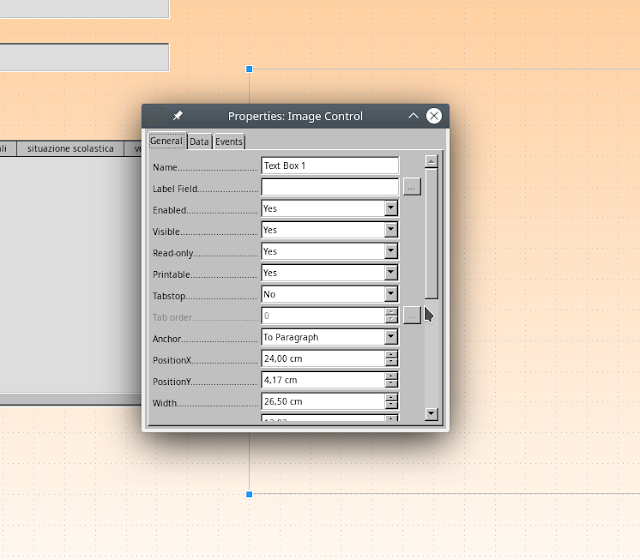
You must set read-only the field of linked pictures, as in the image below:

There are two ways:
## 2. in php
You can also use php code, as in the following way
(inspired from this page (https://stackoverflow.com/questions/3776682/php-calculate-age), and _slighty modified_:
$dob =”$row[anno_nascita]”;
$age = date_diff(date_create($dob), date_create(‘now’))->y;
echo “age: $age years
“;
1.do this sql query:
select *,year(CURDATE())-year(anno_nascita) age from studenti__classi;
2. save the result as view
3. and so you will have, in the view, the age (of your students, i.g.) that can work in LibreBase (to connect with that view).