Add “okular-extra-backends” in Synaptic.
link, rather than embed images in odb file
Today I followed this way: link rather than embed the images, so that the odb file can remain of small size.
1. in edit view add a text box in your form and
2. convert it (replace with) to a image control
3. in normal view double click on the new box and select the image, which will not embedded, but linked.
1. in edit view add a text box in your form and
2. convert it (replace with) to a image control
3. in normal view double click on the new box and select the image, which will not embedded, but linked.
with mysql
If you use a mysql database you can set the field as varchar (at least 150 char) and insert the location, such as http://localhost/your-path/yourfile.jpg.
Then you can add this field as data in the text box (as above).
read text in LibreOffice
The best solution is not espeak, but pico (python -> pico). You have to install pico libraries, as you can see here.
cambiare formattazione ai campi in LibreOffice

Change style in fields:
I campi in LibreWriter, a mio parere, hanno di default uno sfondo troppo scuro, che rende difficile la leggibilità del testo. Per cui si può modificarne lo sfondo, come segue:
Modify option Field Shadings in Option -> Tools -> LibreOffice -> Application Colors -> Cat: Text Document according to you preferred color (light grey, f.e.).

visualizzare il testo hidden in LibreWriter
Display hidden text: Tools -> Options -> LibreOffice Writer ->Formatting Aids > Hidden Text must be checked.
convertire un documento in html/epub
E’ meglio non farlo direttamente da LibreOffice, ma con FF Multiconverter, che usa i tag i e b, e non span. Il che permette di ripulire bene, successivamente, il codice sorgente.
LO: tradurre una parola e scrievere quella tradotta a fianco di querla originale
Si tratta di una macro per LibreOffice, con l’estensione Traduttore; ho copiato, da un sito per imparare inglese, un elenco di verbi inglesi, non tradotti; così ho cercato di velocizzare il prcesso di traduzione e aggiunta della parola tradotta a fianco di quella originale.
Riporto la soluzioone, dal sito AskLibreOffice:
Solved, with the help of macro’s author!
- After inserting ~/.config/libreoffice/4/user/Scripts/python/TradutorLibreText.py
- and after installing libreoffice-script-provider-python
This is my macro
sub translate_word
rem ———————————————————————-
rem define variables
dim document as object
dim dispatcher as object
rem ———————————————————————-
rem get access to the document
document = ThisComponent.CurrentController.Frame
dispatcher = createUnoService(“com.sun.star.frame.DispatchHelper”)
rem ———————————————————————-
dim args1(0) as new com.sun.star.beans.PropertyValue
args1(0).Name = “Language”
args1(0).Value = “Current_Italian (Italy)”
dispatcher.executeDispatch(document, “.uno:LanguageStatus”, “”, 0, args1())
rem–nuovo inserim inizio
Dim oScriptProvider, oScript
oScriptProvider = ThisComponent.getScriptProvider()
oScript = oScriptProvider.getScript(“vnd.sun.star.script:TradutorLibreText.py$TradutorLibreText?language=Python&location=user”)
oScript.invoke(array(), array(), array())
rem–nuovo inserim fine
rem ———————————————————————-
dispatcher.executeDispatch(document, “.uno:WordLeftSel”, “”, 0, Array())
rem ———————————————————————-
dispatcher.executeDispatch(document, “.uno:Copy”, “”, 0, Array())
rem ———————————————————————-
dispatcher.executeDispatch(document, “.uno:Undo”, “”, 0, Array())
rem ———————————————————————-
dispatcher.executeDispatch(document, “.uno:Undo”, “”, 0, Array())
rem ———————————————————————-
dispatcher.executeDispatch(document, “.uno:GoToEndOfLine”, “”, 0, Array())
rem ———————————————————————-
dim args7(0) as new com.sun.star.beans.PropertyValue
args7(0).Name = “Text”
args7(0).Value = ” ”
dispatcher.executeDispatch(document, “.uno:InsertText”, “”, 0, args7())
rem ———————————————————————-
dispatcher.executeDispatch(document, “.uno:Paste”, “”, 0, Array())
rem ———————————————————————-
dim args9(0) as new com.sun.star.beans.PropertyValue
args9(0).Name = “Text”
args9(0).Value = “)”
dispatcher.executeDispatch(document, “.uno:InsertText”, “”, 0, args9())
rem ———————————————————————-
dispatcher.executeDispatch(document, “.uno:GoToPrevWord”, “”, 0, Array())
rem ———————————————————————-
dispatcher.executeDispatch(document, “.uno:GoToPrevWord”, “”, 0, Array())
rem ———————————————————————-
dim args12(0) as new com.sun.star.beans.PropertyValue
args12(0).Name = “Text”
args12(0).Value = “(”
dispatcher.executeDispatch(document, “.uno:InsertText”, “”, 0, args12())
rem ———————————————————————-
dim args13(1) as new com.sun.star.beans.PropertyValue
args13(0).Name = “Count”
args13(0).Value = 1
args13(1).Name = “Select”
args13(1).Value = false
dispatcher.executeDispatch(document, “.uno:GoLeft”, “”, 0, args13())
rem ———————————————————————-
dispatcher.executeDispatch(document, “.uno:WordRightSel”, “”, 0, Array())
rem ———————————————————————-
dispatcher.executeDispatch(document, “.uno:WordRightSel”, “”, 0, Array())
rem ———————————————————————-
dim args16(1) as new com.sun.star.beans.PropertyValue
args16(0).Name = “Count”
args16(0).Value = 1
args16(1).Name = “Select”
args16(1).Value = true
dispatcher.executeDispatch(document, “.uno:GoRight”, “”, 0, args16())
rem ———————————————————————-
dim args17(0) as new com.sun.star.beans.PropertyValue
args17(0).Name = “Color”
args17(0).Value = 8421504
dispatcher.executeDispatch(document, “.uno:Color”, “”, 0, args17())
rem ———————————————————————-
dim args18(2) as new com.sun.star.beans.PropertyValue
args18(0).Name = “FontHeight.Height”
args18(0).Value = 8
args18(1).Name = “FontHeight.Prop”
args18(1).Value = 100
args18(2).Name = “FontHeight.Diff”
args18(2).Value = 0
dispatcher.executeDispatch(document, “.uno:FontHeight”, “”, 0, args18())
end sub
LibreOffice: vedere a che punto della struttura dei capitoli siamo
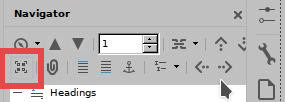
Dobbiamo premere su “Content navigation view”, cioè l’icona nell’immagine qui sotto:

md linux viewer
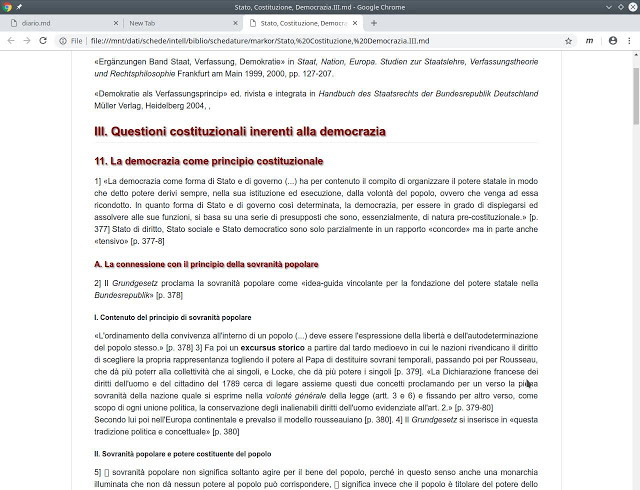
Ci sono diversi editors, ma più raro è trovare visualizzatori (viewers) per linux di files md (markdown).
Dopo aver tentato una estensione di Firefox (https://superuser.com/questions/696361/how-to-get-the-markdown-viewer-addon-of-firefox-to-work-on-linux/1175837#1175837) che ha richiesto di modificare i mimetypes del sistema con esiti disastrosi, ho optato per una estensione di Chrome, MarkDown Viewer, che è andata a buon fine al primo colpo (mentre su Firefox avevo dovuto sudare sette camicie), non ha problemi di encoding e rende correttamente le immagini “ridimensionate” e “stilizzate”, ed è inoltre personalizzabile nella resa mediante il css (content.css): si veda il seguente file md

problema di visualizzazione di simboli
Si risolve dichiarando il font-family con uno span=class per esempio.
how to convert an md file md in odt
You can use pandoc.
In Linux you can then add to Dolphin menu a new action, like: “pandoc %U -o %u.odt && rename 's/md.odt/odt/' *.odt“
I prefer this:
cat %U >> Archivio/$(basename "%u") && sed -i -e 's@<span class="symbol">\\<\\/span>@[\\]{custom-style="symbol"}@g' -e 's@<span class="symbol">\\<\\/span>@[\\]{custom-style="symbol"}@g' -e 's@<span class="symbol">\\<\\/span>@[\\]{custom-style="symbol"}@g' -e 's@<span class="symbol">\\<\\/span>@[\\]{custom-style="symbol"}@g' %U && pandoc --lua-filter odt-custom-styles.lua %U -o %u.odt --reference-doc="default.ott" -f markdown-auto_identifiers && rename 's/md.odt/odt/' *.odtwhere defaul.ott (LibreOffice defaul template, so that I get an odt file with desired styles) is symlinked from /home to the folder where I have the md files.
Prefer the last pandoc realease, which recognizes filters.
Convert blockquotes
Not:
normal text
> blockqoute
normal text
but
normal text
> blockqoute
normal text