You have both smartphone and PC connected at the same network. But no connction between the two.
A possible reason is a firewall on the smartphone, .i.g. ReThink. In this case you should exclude KDE connect from firewall.
a thoughtful use of digital
You have both smartphone and PC connected at the same network. But no connction between the two.
A possible reason is a firewall on the smartphone, .i.g. ReThink. In this case you should exclude KDE connect from firewall.
If your smartphone doesn’t connect any more with the PC, the problem could be <b>the firewall</b>.
To fix this, you can:
1.install gufw
2.Open gufw from app launcher
Go to the Rules tab
Click the [+] button to add a new rule
Select the direction “Both”
Select category “Network:
Select Application “KDE connect”
Click “Add”
Done!
If you cannot speak-to-text directly from the smartphone to PC, you can before dictate a text within KDE Connect and then, after, send it to your PC (provided that your smartphone and your PC are both connected with KDE Connect):
KDE Connect (on smartphone) – > remote input -> small icon on high, as below

Then choose as keyboard, Google Voice Typing

Then you will be able to dictate your text (seeing it, before, on the smartphone [KDE connect] screen) and send it to your Desktop device.

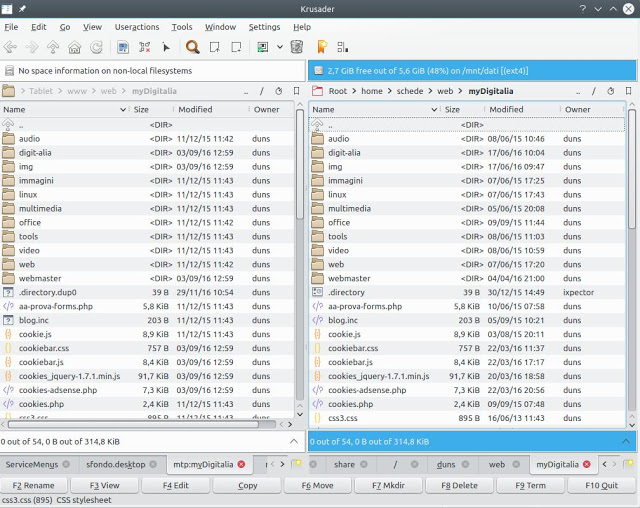
Parlo per esperienza: smartphone e tablet android.
Si può usare KDE connect (purché si sia collegati alla stessa rete wifi), ma un modo più rapido e solido è connettere via cavo (mini-usb): Dolphin riconosce immediatamente il tablet o lo smartphone, ma non può fare la sincronizzazione dei files.
Allora si può usare Krusader: purché la vostra distro abbia attivato il modulo “KDE smtp” (in PcLos kio5-smtp, in altre distro qualcosa di simile), e potere comparare e sincronizzare le cartelle tra PC e mobile.
 |
| Krusader si connette al tablet via usb |